Top 7 Invoice Scanning Software Tools Compared (2026)
 Admin5 min read
Looking for the best invoice scanning software in 2026? We compare accuracy, features, pricing, and use cases across the top 7 invoice OCR and AI tools.
Introduction
Invoice scanning software has become essential for modern businesses. Manual data entry is slow, error-prone, and difficult to scale—especially as invoice volumes grow. In 2026, most businesses are moving beyond basic OCR and adopting AI-powered invoice processing tools like DocuNero’s AI invoice processing, which automate invoice data extraction with higher accuracy and scalability.
But with so many options available, choosing the right invoice scanning software can be confusing.
In this article, we compare the top 7 invoice scanning software tools based on:
Accuracy
AI capabilities
Ease of use
Scalability
Best use cases
How We Evaluated These Tools
Each tool was reviewed based on:
Invoice data extraction accuracy
Line-item handling
Support for scanned and digital invoices
Automation and integrations
Suitability for different business sizes
Modern platforms like AI-based document OCR and intelligent line-item extraction were weighted more heavily due to their impact on automation and accuracy.
1. DocuNero
Best for: AI-driven invoice and receipt processing with high accuracy
DocuNero is a modern AI-powered document processing platform designed specifically for invoices, receipts, and financial documents. Unlike traditional OCR tools, it understands invoice structure and validates extracted data.
Its core strength lies in automated invoice and receipt processing that works reliably even on scanned and multi-page documents.
Key Features
AI-based line-item extraction
High accuracy on scanned invoices
Multi-currency and tax handling
Batch processing and exports (Excel, CSV, JSON)
Approval workflows and audit readiness
Pros
Excellent accuracy
Scales well for growing teams
Clean, structured output
Cons
Focused on financial documents (not general OCR)
2. ABBYY FlexiCapture
Best for: Large enterprises with complex document workflows
ABBYY FlexiCapture is a well-known intelligent document processing solution used by enterprises worldwide.
Key Features
Advanced OCR and document classification
Customizable extraction rules
Strong enterprise integrations
Pros
Very powerful for complex use cases
Enterprise-grade reliability
Cons
Expensive
Requires setup and configuration
Less beginner-friendly
3. Rossum
Best for: Mid-to-large companies automating accounts payable
Rossum uses AI to extract invoice data with minimal template setup.
Key Features
AI-first invoice processing
Strong line-item extraction
ERP integrations
Pros
Good accuracy
Minimal template maintenance
Cons
Pricing can be high
Less flexible for small businesses
4. Veryfi
Best for: Mobile-first receipt and invoice capture
Veryfi is popular for fast receipt and invoice scanning, especially on mobile devices.
Key Features
Real-time OCR
Mobile SDKs
Quick data extraction
Pros
Fast processing
Developer-friendly APIs
Cons
Limited advanced workflows
Less robust for complex invoices
5. Google Document AI
Best for: Developers building custom invoice solutions
Google Document AI provides invoice parsers as part of its cloud AI services.
Key Features
Pre-trained invoice models
Scalable cloud infrastructure
Strong OCR quality
Pros
High accuracy OCR
Flexible for custom solutions
Cons
Requires engineering effort
No out-of-the-box business UI
6. Microsoft Azure Form Recognizer
Best for: Businesses already using Microsoft Azure
Azure Form Recognizer offers invoice extraction as part of Azure AI services.
Key Features
Prebuilt invoice models
Custom training options
Azure ecosystem integration
Pros
Good accuracy
Enterprise-ready
Cons
Technical setup required
Not beginner-friendly
7. Docparser
Best for: Rule-based document parsing
Docparser allows users to define rules to extract data from documents.
Key Features
Rule-based parsing
PDF and document support
Pros
Flexible for structured documents
No coding required
Cons
Not AI-driven
Struggles with varying invoice layouts
Comparison Summary
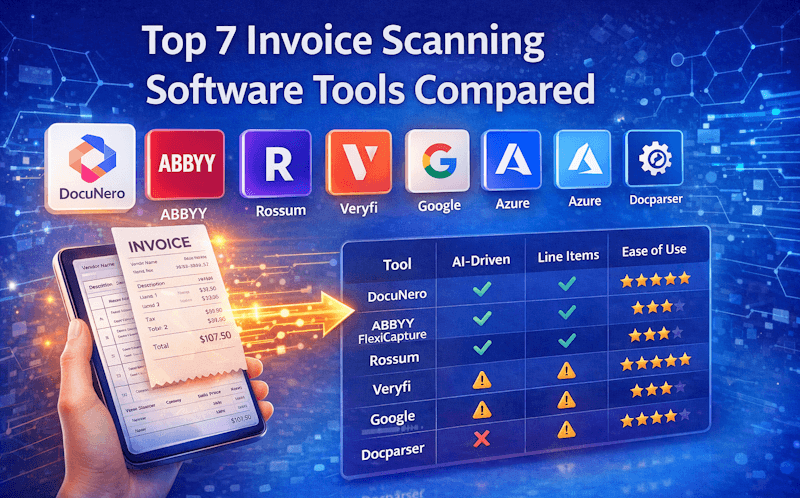
Tool | Best For | AI-Driven | Line Items | Ease of Use |
|---|---|---|---|---|
DocuNero | SMBs & teams | ✅ | ✅ | ⭐⭐⭐⭐⭐ |
ABBYY FlexiCapture | Enterprises | ✅ | ✅ | ⭐⭐ |
Rossum | AP automation | ✅ | ✅ | ⭐⭐⭐⭐ |
Veryfi | Mobile scanning | ⚠️ | ⚠️ | ⭐⭐⭐⭐ |
Google Document AI | Developers | ✅ | ✅ | ⭐⭐ |
Azure Form Recognizer | Azure users | ✅ | ✅ | ⭐⭐ |
Docparser | Rule-based parsing | ❌ | ⚠️ | ⭐⭐⭐ |
AI-driven platforms like DocuNero’s batch invoice processing significantly reduce manual effort when handling high invoice volumes.
How to Choose the Right Invoice Scanning Software
Ask yourself:
Do you need AI accuracy or rule-based extraction?
Are you processing 10 invoices or 10,000?
Do you want a ready-to-use platform or developer APIs?
Is line-item accuracy critical?
For most modern businesses, AI-powered tools provide the best balance of accuracy and scalability.
Conclusion
Invoice scanning software has evolved significantly by 2026. While traditional OCR tools still exist, AI-driven platforms now deliver better accuracy, automation, and scalability.
Tools like DocuNero stand out for businesses that want reliable invoice extraction without complex setup, making them ideal for teams looking to automate accounts payable efficiently.
Choosing the right solution depends on your volume, technical resources, and automation goals—but one thing is clear: manual invoice processing is no longer sustainable.
Ready to get started with DocuNero?
Join thousands of users who trust us to automate their invoices and receipts with AI.
Start Free with DocuNeroAdmin
Admin at DocuNero, helping users simplify invoice and receipt processing through AI-powered automation.
View all posts by AdminRelated Posts

How AI Is Transforming Invoice Processing in 2025: A Complete Guide
AI is reshaping how businesses manage invoices by eliminating manual data entry, reducing errors, and delivering faster, more accurate financial processing. In 2025, modern AI systems extract key fields, categorize expenses, validate totals, and streamline approval workflows—all in seconds. Learn how AI-powered automation helps businesses save time, cut costs, and gain real-time visibility into financial data.
Automating Accounts Payable With AI: A Step-by-Step Workflow
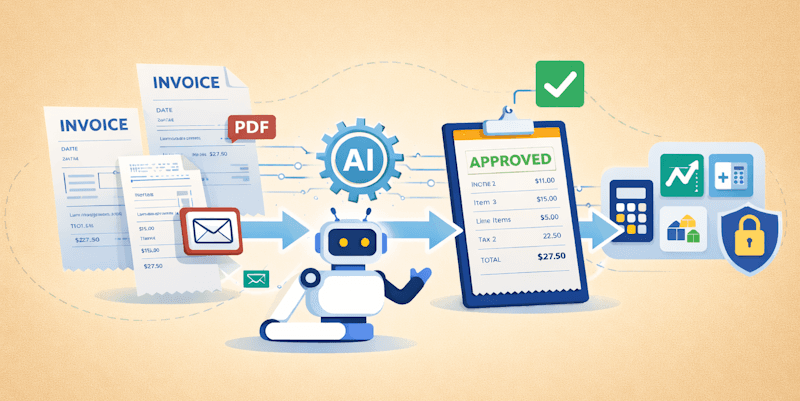
Accounts payable automation with AI helps businesses reduce manual work, improve accuracy, and speed up invoice processing. This guide explains the complete AI-driven AP workflow step by step.