What Is Document OCR Confidence and How to Improve It?
 Admin5 min read
OCR confidence determines how reliable your extracted document data really is. Learn what OCR confidence means, why it matters for productivity, and proven ways to improve accuracy in invoice and receipt processing.
Introduction
Modern businesses process thousands of documents every month— invoices, receipts, contracts, statements, and more. While OCR technology has made document digitization faster, many teams still struggle with errors, rework, and inconsistent results. The root cause is often misunderstood: OCR confidence.
Understanding what document OCR confidence really means—and how to improve it—can dramatically impact productivity, automation success, and data quality. For companies using AI-powered platforms like DocuNero, improving OCR confidence isn’t just about accuracy; it’s about building trust in automated workflows and reducing manual effort across finance and operations.
What Is Document OCR Confidence?
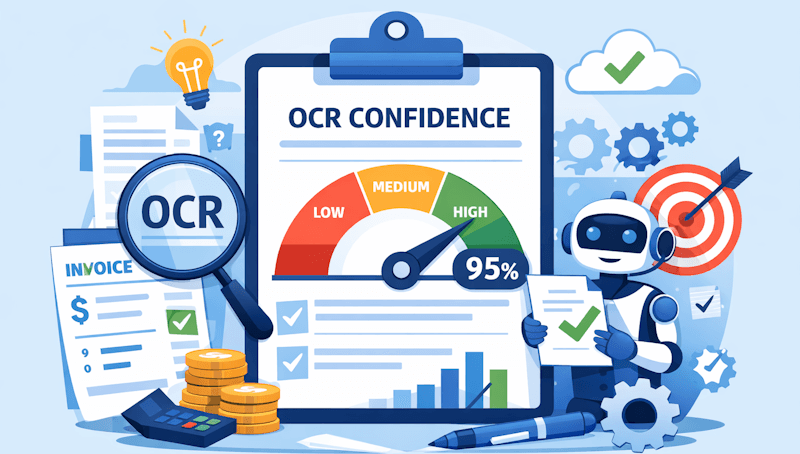
OCR confidence is a score or probability that represents how accurately text has been extracted from a document. It measures how certain the OCR system is that the recognized characters, words, or fields match the original content.
For example, when an OCR engine extracts an invoice total or vendor name, it may assign a confidence score such as 98% or 82%. Higher scores indicate stronger certainty, while lower scores signal potential errors that may require review.
OCR confidence is typically calculated at multiple levels:
Character-level confidence (individual letters or numbers)
Word-level confidence (entire words or values)
Field-level confidence (invoice totals, dates, tax values)
Document-level confidence (overall extraction quality)
Advanced document automation platforms like DocuNero use these confidence signals to decide whether data can flow straight into systems or needs validation through workflows such as AI-powered document OCR.
Why OCR Confidence Matters for Productivity
Low OCR confidence directly affects productivity. Every uncertain value introduces friction—manual checks, corrections, approval delays, and downstream errors in accounting or reporting systems.
High OCR confidence enables:
Straight-through processing without human intervention
Faster invoice approvals and payment cycles
Accurate expense tracking and categorization
Scalable automation as document volumes grow
In contrast, low confidence forces teams back into manual data entry, eliminating the productivity gains automation promises. This is especially critical in invoice processing workflows, where even small errors can cause compliance or reconciliation issues.
What Causes Low OCR Confidence?
OCR confidence drops when the system struggles to interpret document structure or visual clarity. Common causes include:
Poor Document Quality
Blurry scans, shadows, skewed images, and low resolution significantly reduce recognition accuracy. Mobile photos of receipts are especially prone to this, which is why optimized receipt processing workflows are essential.
Complex Layouts
Invoices often contain tables, line items, multi-column layouts, and varying formats. Traditional OCR engines that rely purely on text recognition struggle to understand structure.
Inconsistent Formats
Different vendors use different invoice templates, fonts, and terminology. Without contextual understanding, OCR systems may misclassify fields or extract incorrect values.
Handwritten or Stylized Text
Handwritten notes, signatures, or decorative fonts reduce character recognition reliability and confidence scores.
OCR vs AI-Based Document Understanding
Traditional OCR focuses on reading characters. AI-powered document processing goes further by understanding context, layout, and relationships between data points.
According to IBM’s overview of intelligent OCR and document understanding, modern systems combine machine learning, computer vision, and natural language processing to improve extraction accuracy across complex documents (IBM OCR overview).
This shift is why platforms like DocuNero consistently achieve higher confidence scores than legacy OCR tools. AI models don’t just read text—they understand that a number next to “Total Due” is different from a number inside a line item table.
How DocuNero Uses OCR Confidence
DocuNero doesn’t treat OCR confidence as a passive metric. It actively uses confidence levels to optimize productivity and data reliability.
High-confidence fields are automatically approved and exported, while lower-confidence fields can trigger smart validation rules or approval workflows. This ensures accuracy without slowing down teams with unnecessary reviews.
When processing financial documents, DocuNero combines confidence scoring with intelligent categorization, helping businesses move seamlessly from extraction to insights—especially when paired with automated expense classification as explained in expense categorization best practices.
How to Improve Document OCR Confidence
Improving OCR confidence requires a combination of technical optimization and smarter workflows.
1. Capture Better Input Data
Encourage users to upload high-resolution scans or clear mobile photos. Simple improvements like better lighting and straight alignment can dramatically increase confidence scores.
2. Use AI-Powered OCR Instead of Basic OCR
AI-based document OCR understands structure, context, and intent. This is the foundation of reliable automation and why modern platforms outperform traditional tools.
3. Normalize and Preprocess Documents
Image preprocessing—such as deskewing, noise removal, and contrast enhancement—helps OCR engines extract text more accurately.
4. Leverage Field-Level Validation
Cross-check extracted values against business rules. For example, invoice totals should equal subtotal plus tax. These validations improve accuracy and boost confidence automatically.
5. Train Models on Real-World Documents
Systems trained on diverse invoice and receipt formats perform better across industries and vendors, reducing uncertainty in unfamiliar layouts.
6. Combine OCR Confidence with Human-in-the-Loop Reviews
Instead of reviewing everything, only review low-confidence fields. This targeted approach dramatically reduces manual workload while maintaining accuracy.
OCR Confidence and Compliance
In regulated environments, OCR confidence isn’t optional—it’s critical. Financial audits, tax reporting, and expense claims require accurate records.
High-confidence OCR ensures extracted data aligns with original documents, reducing audit risks and ensuring compliance without slowing down operations.
Choosing the Right OCR Solution
When evaluating OCR platforms, don’t just ask “How accurate is it?” Ask how confidence is measured, used, and improved over time.
DocuNero’s pricing plans are designed to scale with your document volumes while maintaining high OCR confidence across invoices, receipts, and financial documents. You can explore available options and automation capabilities on the DocuNero pricing page.
Final Thoughts: OCR Confidence Is the Foundation of Automation
OCR confidence is more than a technical metric—it’s the foundation of reliable, scalable document automation. Without it, businesses remain stuck in manual verification loops that drain productivity and introduce errors.
By combining AI-powered document OCR, smart validation workflows, and confidence-driven automation, DocuNero helps teams move faster with data they can trust. Whether you’re automating invoices, receipts, or complex financial documents, improving OCR confidence is the key to unlocking real productivity gains.
If your organization is ready to reduce manual effort and trust its document data, start with intelligent document OCR that puts confidence at the center of automation.
Ready to get started with DocuNero?
Join thousands of users who trust us to automate their invoices and receipts with AI.
Start Free with DocuNeroAdmin
Admin at DocuNero, helping users simplify invoice and receipt processing through AI-powered automation.
View all posts by AdminRelated Posts
When Should You Use Batch Processing for Invoices & Receipts?
Learn when batch processing for invoices and receipts makes sense, how it improves productivity, and how AI-powered tools like DocuNero streamline high-volume financial workflows.
The Hidden Costs of Manual Data Entry (And How to Eliminate Them)
Manual data entry may appear inexpensive, but it silently drains productivity, increases errors, and slows financial operations. This article exposes the hidden costs of manual data entry in accounting and explains how AI-powered document automation eliminates inefficiencies at scale.