Automating Accounts Payable With AI: A Step-by-Step Workflow
 Admin4 min read
Accounts payable automation with AI helps businesses reduce manual work, improve accuracy, and speed up invoice processing. This guide explains the complete AI-driven AP workflow step by step.
Introduction
Accounts payable (AP) is one of the most critical finance functions in any business. It ensures vendors are paid on time, records are accurate, and financial operations run smoothly. However, traditional AP processes are often manual, slow, and error-prone.
AI-powered automation is transforming accounts payable by reducing data entry, improving accuracy, and accelerating invoice processing. Instead of spending hours handling invoices manually, finance teams can rely on intelligent workflows that work at scale.
In this guide, we’ll walk through a step-by-step AI-powered accounts payable workflow and explain how modern businesses are automating AP end to end.
What Is Accounts Payable Automation?
Accounts payable automation is the use of technology to streamline and automate tasks such as:
Invoice capture
Data extraction
Validation and approval
Payment preparation
Record keeping
When AI is added to the process, the system can understand documents, validate data, and adapt to different invoice formats automatically.
Why Manual Accounts Payable Processes Fail
Before automation, most AP teams struggle with:
Manual invoice data entry
Paper and email-based approvals
Duplicate or missing invoices
Late payments and vendor disputes
Limited visibility into AP status
As invoice volume grows, these problems scale quickly and impact cash flow and compliance.
How AI Transforms Accounts Payable
AI changes AP by:
Understanding invoice layouts and structures
Extracting accurate data from scanned and digital invoices
Validating totals, taxes, and vendor details
Reducing human intervention
This allows AP teams to focus on exceptions rather than routine tasks.
Step-by-Step AI-Powered Accounts Payable Workflow
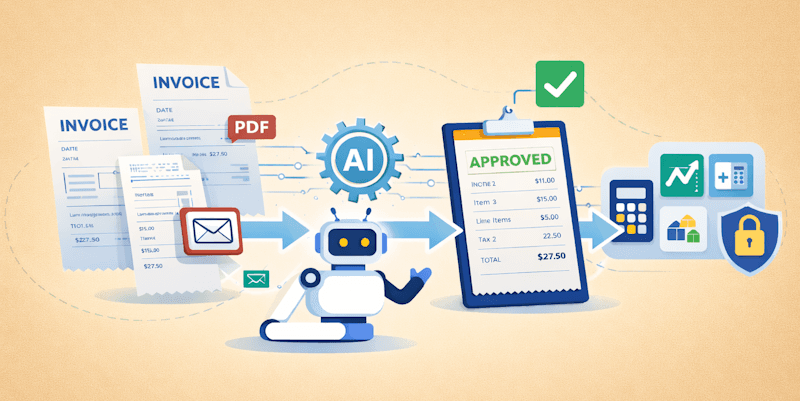
Step 1: Invoice Collection
Invoices are collected from multiple sources:
Email attachments
Uploaded PDFs
Scanned paper invoices
Vendor portals
AI-powered systems support all common invoice formats without requiring manual preparation.
Step 2: Invoice Data Extraction
AI extracts key invoice fields such as:
Vendor name
Invoice number
Invoice date
Line items
Tax and total amounts
Unlike traditional OCR, AI understands context and structure, resulting in higher accuracy.
Step 3: Line Item & Tax Validation
Extracted data is validated automatically:
Line items are checked against totals
Tax calculations are verified
Missing or inconsistent fields are flagged
This step significantly reduces downstream accounting errors.
Step 4: Duplicate & Fraud Detection
AI systems can detect:
Duplicate invoices
Reused invoice numbers
Unusual amounts or vendors
This adds an extra layer of control and reduces the risk of overpayment or fraud.
Step 5: Approval Workflow
Invoices are routed for approval based on:
Amount thresholds
Vendor rules
Department or cost center
Approvals can be completed digitally, eliminating email chains and paper trails.
Step 6: Export & Accounting Integration
Once approved, invoice data is exported to:
Accounting software
ERP systems
Excel or CSV reports
This ensures clean, structured data flows directly into financial systems.
Step 7: Audit-Ready Storage
Invoices and extracted data are stored securely with:
Searchable records
Linked approvals
Timestamped activity logs
This makes audits and compliance reviews faster and easier.
Benefits of Automating Accounts Payable With AI
1. Faster Invoice Processing
Invoices are processed in minutes instead of days.
2. Improved Accuracy
AI reduces human errors in data entry and validation.
3. Lower Operational Costs
Less manual work means lower processing costs per invoice.
4. Better Cash Flow Visibility
Real-time insights into pending and approved invoices.
How DocuNero Supports Accounts Payable Automation
DocuNero helps businesses automate accounts payable by combining OCR with AI-powered document understanding.
Key capabilities include:
Automated invoice and line-item extraction
Support for scanned and digital invoices
Validation of totals, taxes, and currencies
Batch processing for high invoice volumes
Export-ready structured data
This enables finance teams to build reliable, scalable AP workflows without complex setups.
Try DocuNero for Free - Sign-up now
Who Should Use AI-Based AP Automation?
AI-powered AP automation is ideal for:
Small and mid-sized businesses
Growing finance teams
Accounting firms and bookkeepers
Businesses processing high invoice volumes
Any organization looking to reduce manual AP effort can benefit.
When Is the Right Time to Automate Accounts Payable?
Consider automation if:
Invoice volume is increasing
Manual processing causes delays
Errors impact reporting or payments
AP teams are overwhelmed with repetitive tasks
Early adoption delivers faster ROI and smoother scaling.
Conclusion
Manual accounts payable processes are no longer sustainable for modern businesses. AI-powered AP automation streamlines invoice handling, improves accuracy, and delivers real-time visibility into financial operations.
By following a structured, step-by-step workflow, businesses can transform accounts payable from a bottleneck into an efficient, automated process. Platforms like DocuNero make this transition practical, scalable, and accessible—helping finance teams focus on strategy instead of paperwork.
Ready to get started with DocuNero?
Join thousands of users who trust us to automate their invoices and receipts with AI.
Start Free with DocuNeroAdmin
Admin at DocuNero, helping users simplify invoice and receipt processing through AI-powered automation.
View all posts by AdminRelated Posts
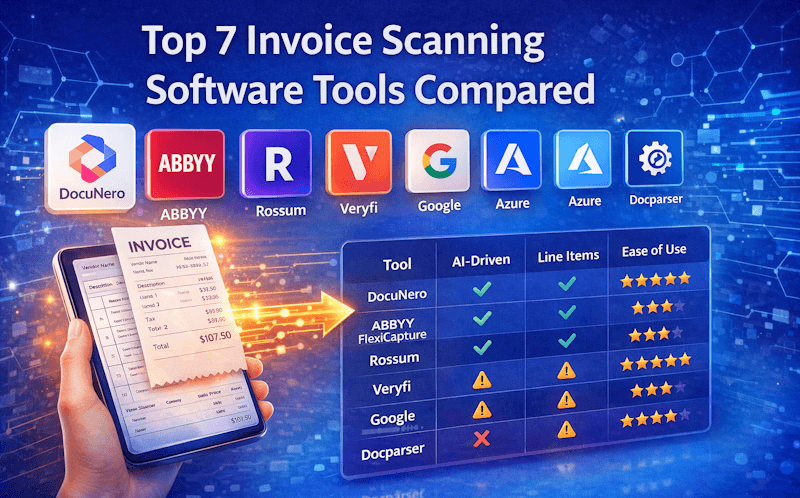
Top 7 Invoice Scanning Software Tools Compared (2026)
Looking for the best invoice scanning software in 2026? We compare accuracy, features, pricing, and use cases across the top 7 invoice OCR and AI tools.

How AI Is Transforming Invoice Processing in 2025: A Complete Guide
AI is reshaping how businesses manage invoices by eliminating manual data entry, reducing errors, and delivering faster, more accurate financial processing. In 2025, modern AI systems extract key fields, categorize expenses, validate totals, and streamline approval workflows—all in seconds. Learn how AI-powered automation helps businesses save time, cut costs, and gain real-time visibility into financial data.