A Beginner’s Guide to Receipt Digitization for Businesses
 Admin3 min read
Receipt digitization helps businesses reduce paperwork, improve expense tracking, and stay audit-ready. This beginner’s guide explains what it is, why it matters, and how to get started.
Introduction
Receipts are a critical part of every business—used for expense tracking, reimbursements, tax reporting, and audits. Yet many businesses still rely on paper receipts, email attachments, or scattered photos stored across devices.
Receipt digitization helps businesses convert physical and digital receipts into searchable, structured, and secure digital records. For beginners, the concept may sound technical, but the benefits are simple: less paperwork, better organization, and improved financial visibility.
This guide explains receipt digitization in plain terms and shows how businesses can get started.
What Is Receipt Digitization?
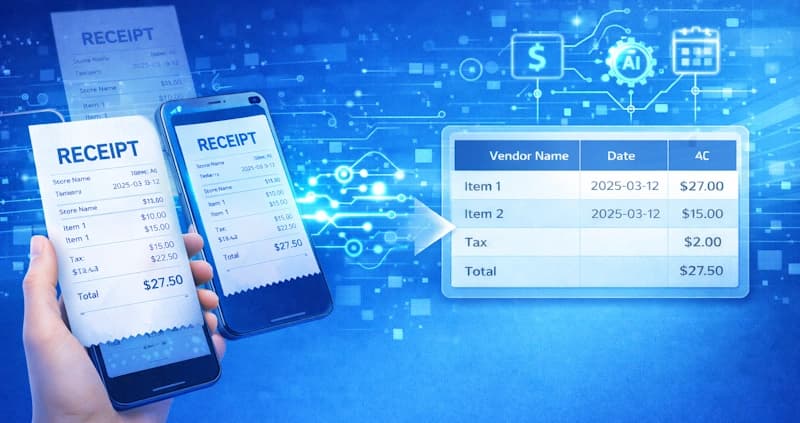
Receipt digitization is the process of converting receipts—paper or digital—into structured digital data.
This usually involves:
Scanning or uploading receipt images
Extracting key details such as date, vendor, amount, and tax
Storing data securely for future access and reporting
Instead of keeping physical receipts, businesses maintain a centralized digital record.
Why Receipt Digitization Matters for Businesses
1. Reduces Manual Work
Manually sorting and entering receipt data is time-consuming. Digitization eliminates repetitive data entry and reduces administrative overhead.
2. Improves Expense Tracking
Digitized receipts make it easier to:
Categorize expenses
Track spending trends
Reconcile accounts accurately
3. Simplifies Tax & Compliance
During tax season or audits, businesses must provide supporting documents. Digitized receipts are:
Easy to search
Easy to export
Less likely to be lost or damaged
4. Enables Remote & Paperless Workflows
With digital receipts, teams can upload and access data from anywhere—ideal for remote teams and modern finance operations.
Common Challenges With Manual Receipt Handling
Businesses that rely on manual receipt management often face:
Lost or faded paper receipts
Duplicate or missing records
Incorrect expense categorization
Delays in reimbursements
Difficult audits and reconciliations
These issues grow as the business scales.
How Receipt Digitization Works
Step 1: Capture
Receipts are captured using:
Mobile photos
Scanned documents
Email attachments
Uploaded PDFs
Step 2: Data Extraction
OCR (Optical Character Recognition) reads text from receipts, identifying:
Vendor name
Date
Total amount
Tax
More advanced systems use AI to understand receipt structure.
Step 3: Structuring & Storage
Extracted data is converted into structured fields and stored securely for reporting, export, or integration with accounting tools.
OCR vs AI for Receipt Digitization
Traditional OCR
Reads text only
Struggles with low-quality images
Limited understanding of receipt layout
AI-Powered Digitization
Understands receipt formats and patterns
Improves accuracy over time
Handles multiple receipt styles and vendors
AI-based systems deliver cleaner, more reliable data for businesses.
How DocuNero Helps Businesses Digitize Receipts
DocuNero simplifies receipt digitization by combining OCR with AI-powered document understanding.
Key capabilities include:
Automatic extraction of receipt details
Support for scanned and digital receipts
Structured data ready for export
Centralized receipt storage
Reduced manual intervention
This allows businesses to focus less on paperwork and more on insights.
Digitize Your Receipts in Minutes
Upload receipts and let AI automatically extract dates, vendors, totals, and taxes—no manual data entry required.
Who Should Use Receipt Digitization?
Receipt digitization is useful for:
Small and medium businesses
Freelancers and consultants
Finance and accounting teams
Operations and admin teams
Any organization that handles regular expenses benefits from going digital.
When Should a Business Start Digitizing Receipts?
A good time to start is when:
Receipts are piling up
Expense reporting is inconsistent
Manual data entry causes delays
Tax or audit preparation becomes stressful
Early adoption makes scaling easier and more cost-effective.
Best Practices for Getting Started
Capture receipts as soon as possible
Use consistent upload methods
Review extracted data periodically
Store receipts securely and centrally
Choose tools that scale with your business
Conclusion
Receipt digitization is no longer just a convenience—it’s a necessity for modern businesses. By moving away from paper-based processes, businesses gain better visibility, accuracy, and control over expenses.
For beginners, starting small and adopting the right tools can make a significant difference. As businesses grow, digitized receipts become the foundation for automation, compliance, and smarter financial decision-making.
Ready to get started with DocuNero?
Join thousands of users who trust us to automate their invoices and receipts with AI.
Start Free with DocuNeroAdmin
Admin at DocuNero, helping users simplify invoice and receipt processing through AI-powered automation.
View all posts by Admin